The main interface is comprised of various elements that interact with each other. Each element will be explained in more detail in the respective section.
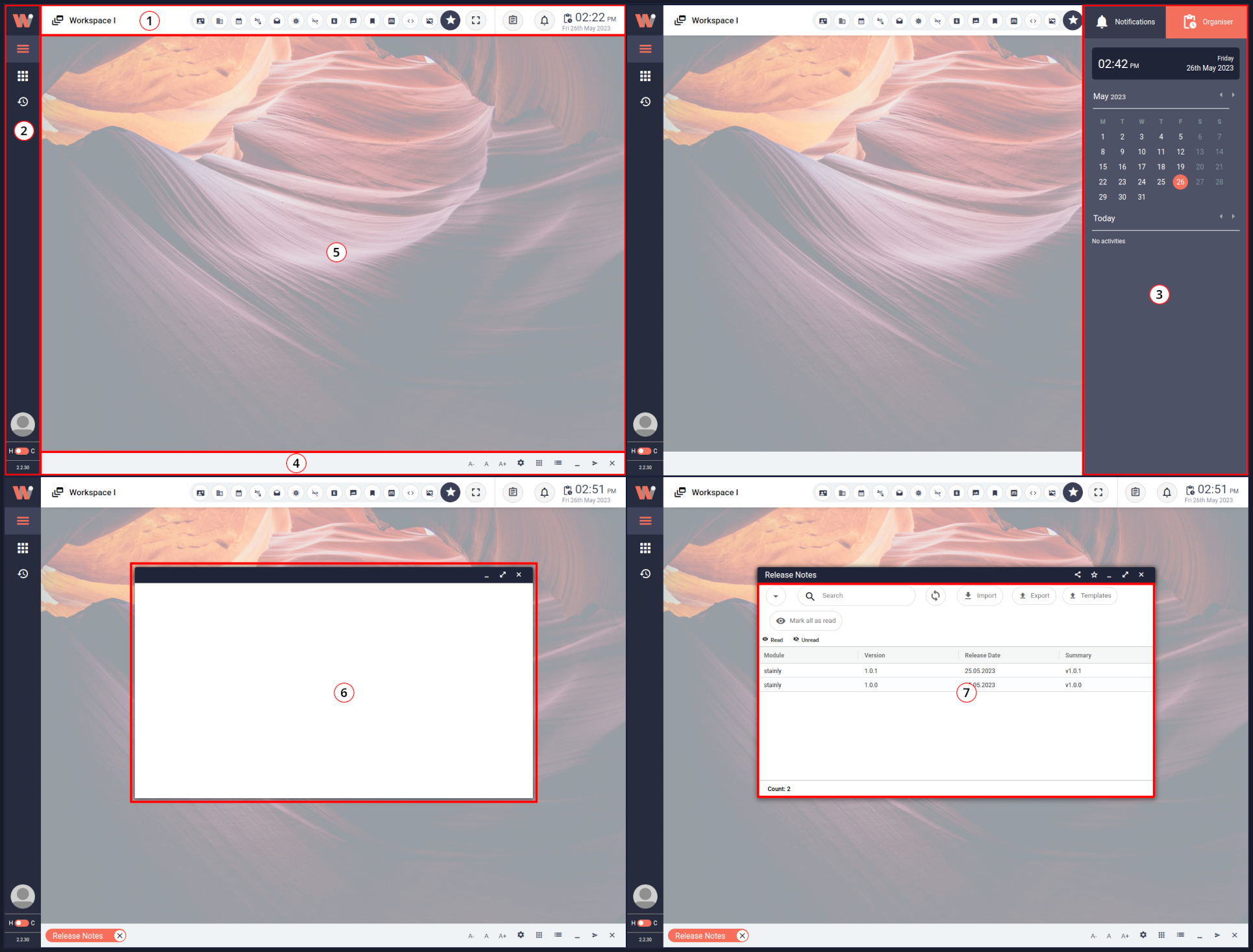
Workspace with annotated individual elements.
For a better understanding, we want to give an overview of the name of each element and a brief description of what it does. This allows each section to refer to other elements when describing interactions that have not been explained yet. The table below lists the indices you can see in the image above, states, the names, and provides a brief description of the corresponding element.
1. Workbench Header
Contains controls and information that are useful independent of the visualized data.
2. Left Sidebar
Is collapsible, and provides menus for opening and managing views, logout, and managing the user profile.
3. Right Sidebar
Hidden until needed. Contains the notification center and an organizer.
4. Bottom Bar
Always visible at the bottom edge of the screen. Shows tabs for each open view, and offers font and window controls.
5. View Area
The largest part of the main UI. It supports two view modes - single view and multiple views. Windows are rendered here when in multiple views mode.
6. Work-Window
Work-Window behaves similarly to a desktop window or a browser window. Renders a view as its content. Windows are only rendered when the view mode is set to render multiple views at a time.
